Photo storage cleaner for iPhone and iPad

Reclaim your storage.

Find the photos and videos quietly eating your iPhone, and clear them without losing a memory.

On devicePrivateNo account

Scanning and every figure are free. Your first 1 GB of cleanup is free too.

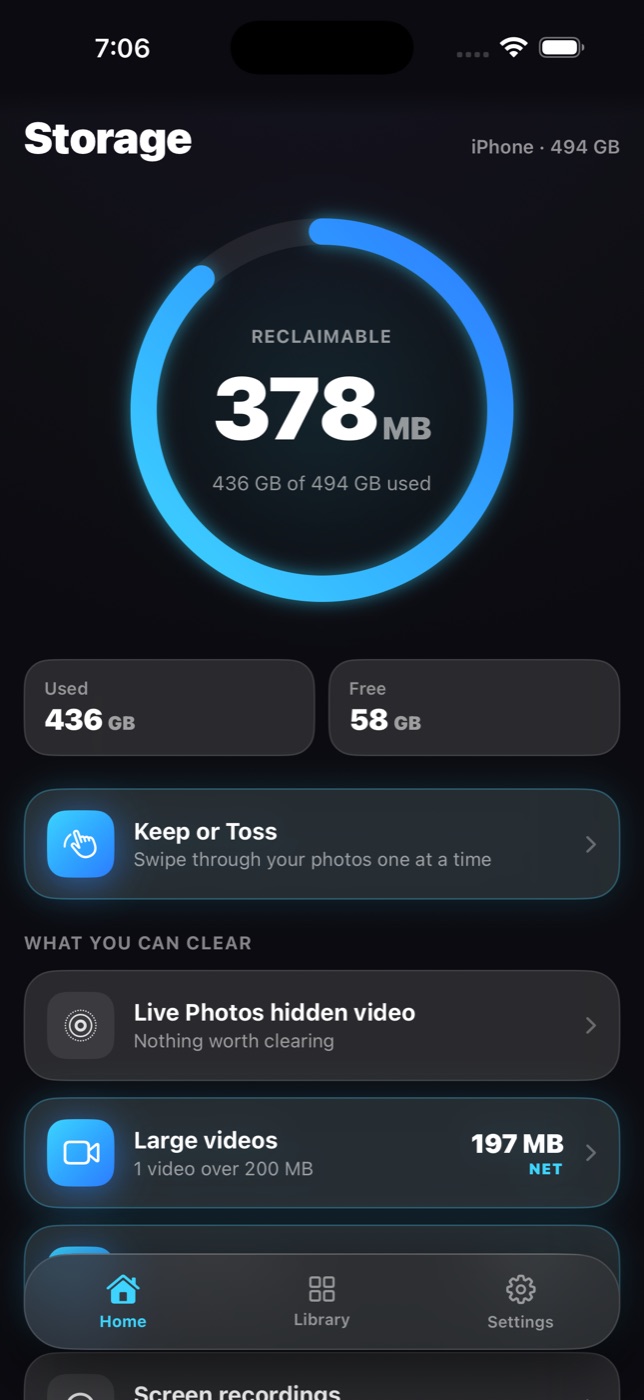
Reclaim home screen showing the reclaimable space ring and the categories it found
Live Photos
hidden video clips
Large videos
compress with a preview
Duplicates
the sharpest shot is kept
Every number is real

Net, never gross.
Measured, never guessed.

Every figure Reclaim shows is the space you actually get back, not the size of the files. If a saving is too small to matter, it is never offered at all.

1

Compression is the difference

A 1.5 GB video compressed into a 630 MB file frees 870 MB, so that is what it says.

1.5 GB → 630 MB  =  870 MB back
2

Nothing counted twice

A photo appears in one row only. The ring on Home is the sum of what is actually on offer.

3

Checked afterwards

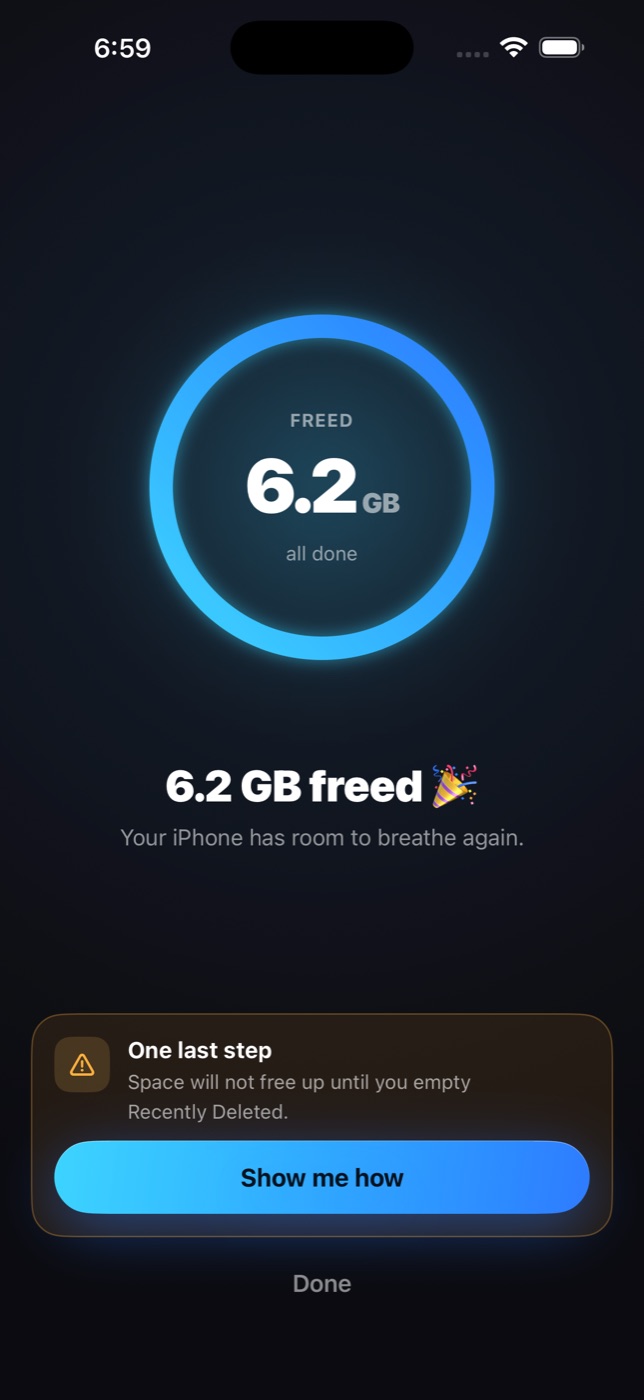
When your free space comes back, Reclaim tells you how much your iPhone really gained.

You get back
0MB
from a 1.5 GB video
compressed to 630 MB
What it finds

The things you would happily delete, if you could find them.

Live Photos

Keep the picture at full quality and drop the hidden video clip behind it.

Large videos

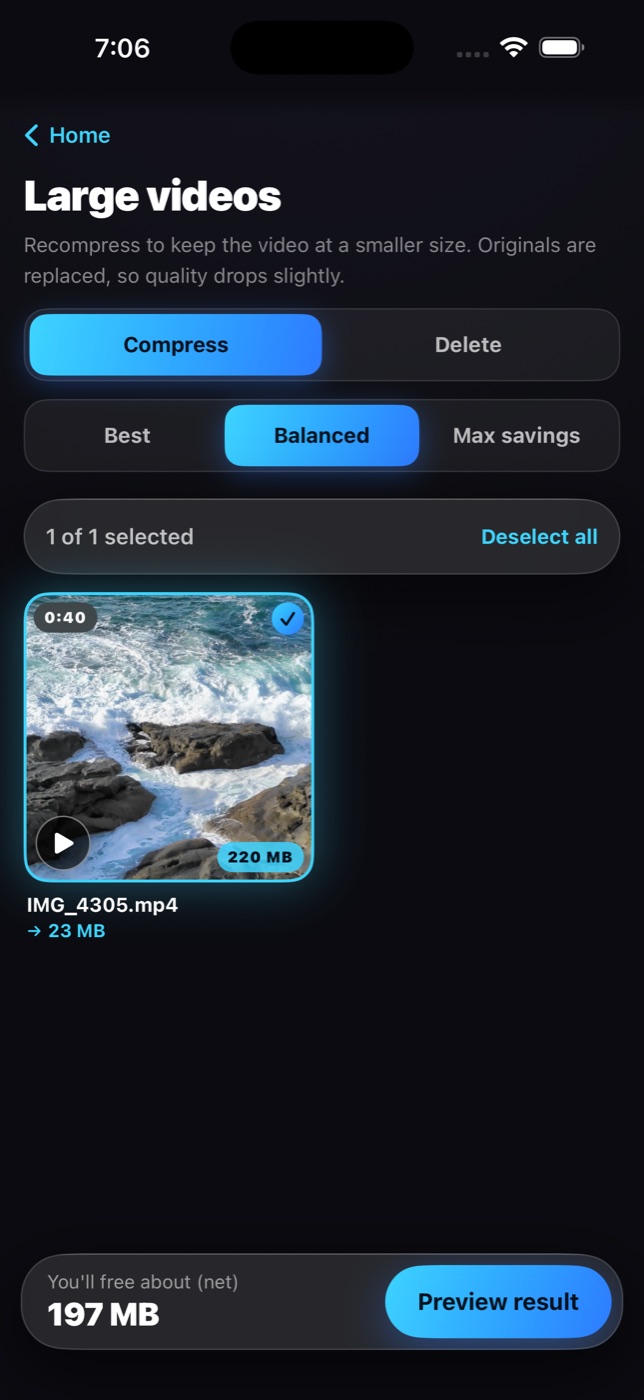
Compress to HEVC with a side by side preview before anything is replaced, or delete outright.

Large photos

Re encode oversized JPEG and PNG files to HEIC. The size you see is the size of a file that was actually produced.

Duplicates and bursts

Near identical shots grouped together. The sharpest one is kept, the rest are offered.

Expired screenshots

Flown flights, used login codes, past tickets and old receipts, read from their own text and grouped for you.

Chat images

Memes and forwards saved from conversations, found by the camera data they never had.

Recordings, blur, scenery

Screen recordings, blurry shots, and landscapes with nobody in them, each in its own row.

Keep or Toss

When the categories are not enough, swipe through your library one photo at a time.

The view Apple does not show you

Your whole library, biggest first.

Photos sorts by date. Reclaim sorts by size, so the one file eating your storage is the first thing on screen.

Every photo and video, sorted by what it costs you
Filter to videos, photos or Live Photos
Open, zoom, share or delete anything from the viewer
Large videos screen with a compression preview
How it works

Three steps. The last one is yours.

Reclaim never removes anything without your confirmation, and never claims a deletion is permanent, because it is not.

1

Scan

Reclaim reads your library on the device and measures every file. Nothing is uploaded, and nothing changes.

2

Choose

Open a row, see exactly what you get back, and confirm. Everything goes to Recently Deleted, where Apple keeps it for 30 days.

3

Empty Recently Deleted

The one step no app can do for you. Reclaim walks you there, then checks that the space really came back and tells you how much.

Success screen showing the freed figure and the last step
Nothing is lost

Recoverable for 30 days. Always.

Every removal goes through Apple's Photos into Recently Deleted. Change your mind, and it is right there. Reclaim says so on every confirmation.

Confirm in Reclaim, then confirm again in iOS
The freed figure stays on Home until the space appears
Then it shows what your iPhone actually gained
Private by design

Nothing leaves your phone.

Everything runs on your device with Apple's own frameworks. There is no account to make, nothing to sign in to, and no server anywhere that ever sees a photo.

Uploads
Account
Analytics
Ads
Tracking
Servers
Pricing

Free to look. Free to start.

The scan, the size sorted library and every figure are free, and so is your first 1 GB of cleanup. Pro is for everything after.

Free

$0
No account, no trial, no card
  • Full scan of your library
  • Every row, every figure, every preview
  • Your library sorted biggest first
  • The first 1 GB of cleanup
Get Reclaim
Best value yearly

Reclaim Pro

$49.99/ year
or $4.99 a month. Cancel anytime in your Apple ID settings.
  • Everything in Free
  • Cleanup without limits
  • Live Photo conversion, video and photo compression
  • Keep or Toss, duplicates, screenshots and every other row
Get Reclaim Pro

Sold through Apple. Renews automatically unless cancelled at least 24 hours before the end of the period.

FAQ

Questions, answered plainly.

Is anything deleted permanently?

No. Everything Reclaim removes goes to your Recently Deleted album, where Apple keeps it for 30 days. You can put anything back from there.

Why do I have to empty Recently Deleted myself?

Apple does not let any app empty that album. It is a safety net, and only you can clear it. Reclaim shows you the three taps, then checks that the space came back.

Do my photos get uploaded anywhere?

Never. Scanning, duplicate detection and screenshot reading all run on your device with Apple's own frameworks. Reclaim has no servers and no account.

Why is the number smaller than the file size?

Because it is the space you actually get back. Compressing a video frees the difference between the old and new file, not the whole file, and that is the figure you see.

What do I get for free?

The scan, the size sorted library, every figure and every preview, and your first 1 GB of cleanup. After that, cleanup actions need Reclaim Pro.

Does it work with iCloud Photos?

Yes. Reclaim measures what Photos reports for each item and, after you empty Recently Deleted, waits only for the space that was actually on your device to come back.
Your phone has room to breathe.

Free to scan, free to see every figure, free for your first gigabyte.

For iPhone and iPad.